Loading...

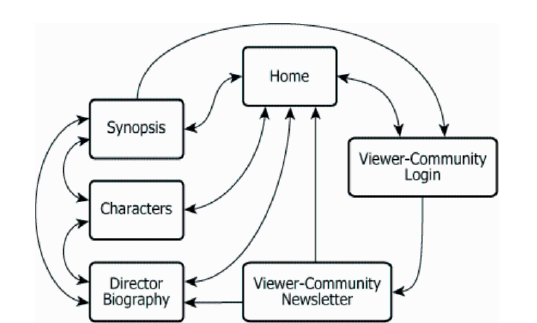
The diagram shows the structure of the official website for a certain film. Each box represents one page on the site, and each line represents a link between pages. For any of these pages (A) and any other of these pages (B), it is possible to navigate directly from A to B if and only if a line connects A and B and an arrowhead on that line points to B.
Select from the drop-down menus the options that create the statement that most accurately reflects the information provided.
| Text Component | Original Text | Interpretation |
|---|---|---|
| Diagram Purpose | The diagram shows the structure of the official website for a certain film. | Diagram illustrates the organization of the film website's pages and their connections. |
| Box Means | Each box represents one page on the site. | Each rectangle in the diagram stands for a single webpage. |
| Line Means | Each line represents a link between pages. | Lines indicate possible navigation (hyperlinks) between two web pages. |
| Navigation Rule | For any of these pages (A) and any other of these pages (B), it is possible to navigate directly from A to B if and only if a line connects A and B and an arrowhead on that line points to B. | To get from A to B by clicking once, there must be a line (link) with an arrow pointing at B. |
| Chart Feature | Description | What It Shows / Implies |
|---|---|---|
| Chart Type | Flowchart (site-map) with six labeled rectangular nodes and arrows between nodes. | Shows navigation possibilities among website pages. |
| Node Labels | Pages: Home, Synopsis, Characters, Director Biography, Viewer-Community Newsletter, Viewer-Community Login | Each site page is shown as a labeled rectangle. |
| Home page links | Home connects bidirectionally to all other pages (arrows point both to and from Home). | Home serves as a central hub for navigation. |
| Left sequence | Unidirectional links: Synopsis → Characters → Director Biography | You can only advance in one direction between these left pages. |
| Newsletter outgoing link | From Newsletter, arrow only goes to Home. | After reading Newsletter, you can only go directly to Home. |
| Login to Newsletter link | Viewer-Community Login → Viewer-Community Newsletter (unidirectional) | You can enter Newsletter only from Login (not the reverse). |
Using the fewest links possible and only those shown in the diagram, navigating from the Viewer-Community Newsletter page to the [BLANK] page...
What is needed: Which page requires exactly one intermediate page (not counting the start or end) when going from Newsletter using links in the diagram.
Navigating from the Viewer-Community Newsletter page to the Viewer-Community Login page requires visiting exactly [BLANK] intermediate pages...
What is needed: How many intermediate pages are visited when traveling the shortest allowed path between Newsletter and Viewer-Community Login.
The only way to reach Viewer-Community Login from the Newsletter page using the fewest links is by going Newsletter → Home → Viewer-Community Login. In this path, you only pass through Home as the intermediate page, so the destination is Viewer-Community Login and the number of intermediate pages is 1.
The questions are linked: identifying the correct destination with a particular number of intermediate pages directly leads to the answer for both blanks. The number of intermediate pages in the shortest path to each candidate destination determines which destination fits the stated condition.